 Halt, a Shopify app
Halt stops
card-testing bots
before the card
is charged
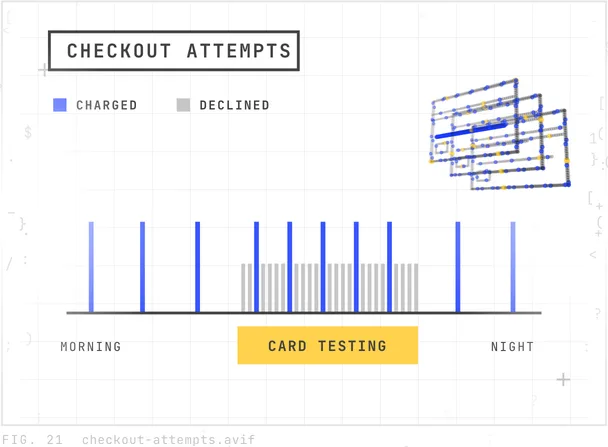
A bot runs stolen card numbers through your checkout to find the ones that work. You get the refunds, and you lose a fee on every one. Halt refuses those checkouts inside Shopify, at the payment step, before any charge.

The short version
How do you stop card testing on Shopify?
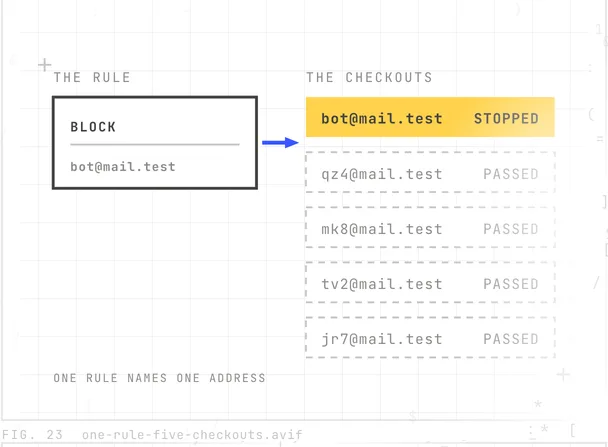
Refuse the checkout before the card is charged. Halt does that inside Shopify. It checks every checkout at the payment step and refuses the ones that reuse the same email, address, or phone number within a day. Nothing is charged, so there is nothing to refund and no fee to lose. Customers who have ordered from you before are never stopped. It works on every Shopify plan, and it starts in watch mode so you can see it work before it blocks anything.
The problem
Forty orders overnight, and not one of them is real
A candle shop in Henderson opens the laptop at seven and finds forty orders for the cheapest item in the store. Every name is different. Every address is nonsense. Every card was charged. Now every one has to be refunded by hand, and Shopify keeps the card fee on each refund. The shop sold nothing and paid forty fees.
That is card testing. Somebody with a list of stolen numbers is using your checkout to find out which ones still work. The ones that pass get sold on or used somewhere bigger. Your store was only the test.
Why it keeps happening
Four reasons a store gets hit
Bots skip your storefront
They go straight to checkout with a list of stolen card numbers and try them one after another. Each one that works gets sold on. Your store is just the test bench.
Every try costs you a fee
Each order is a real charge, so each refund is a real refund. Shopify keeps the card processing fee on a refunded order. On a busy night that is dozens of fees for nothing sold.
Most tools act after the order
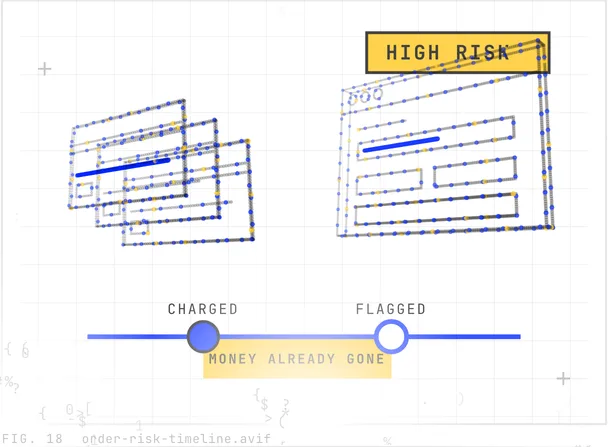
Fraud analysis looks at an order once it exists. By then the charge has happened, the fee is gone, and the refund is your job.
Nobody is watching at three in the morning
That is when it happens. A store owner finds out at breakfast, from a pile of order emails with names that do not exist.
What Halt does about it
Before the charge, not after
Shopify lets an app check a checkout at the payment step, before the card is charged, through what it calls checkout validation. Halt runs there. When a checkout reuses details that have already come through that day, it is refused on the spot. The bot sees a decline. You see one line in your Activity log. Nothing is charged, so nothing is refunded.
What it includes
Everything on the box
- Stops repeat checkouts from the same email, address, or phone within one day.
- Works on every Shopify plan, including Basic. Nothing to add to your theme or checkout.
- Starts in watch mode. You see what it would stop before it stops anything.
- A bait product: a trap item only a bot would buy. A guest checkout with it in the cart is refused.
- Stops throwaway email addresses, and lookalike addresses you define yourself.
- Customers who have ordered from you before are never stopped.
- Emails you when an attack starts, and a daily summary on busy days.
- Takes a stopped bot off your email list, in Shopify Email or Klaviyo, usually within minutes.
- Keeps the email of a stopped checkout, encrypted, so you can see who was stopped. Never keeps phone numbers or street addresses.
Setting it up
Three steps, and the first one is the install
Install it
One click from the Shopify App Store. It runs inside Shopify checkout, so there is nothing to add to your theme.
Watch for a day
Halt starts in watch mode. The Activity page shows every checkout it would have stopped, and why, with the email masked.
Turn on protection
One button. From then on, matching checkouts are refused at the payment step, before any charge. One click allows a real customer for good.
Price
Free for 14 days, then $6.99 a month
One plan, every feature, unlimited checkouts. No usage fees and no per-order fees, so a busy night costs the same as a quiet one. If you uninstall, Shopify cancels the subscription and nothing more is charged. One refunded fee a month pays for it.
Halt keeps the email of a checkout it stopped, encrypted, so you can see who was stopped. It never keeps a phone number or a street address, only a short fingerprint of each. The details are in our privacy policy.
Straight answers
Questions store owners ask before they install
What is card testing?
Card testing is when someone with a list of stolen card numbers runs them through an online checkout to find the ones that still work. They use small orders so nobody notices. The store owner is left with the refunds, and the card fee on each one is not returned.
Will Halt stop my real customers?
The default limits are gentle: three checkouts in a day from the same email or address, five from the same phone. Anyone who has ordered from you before passes every time. If a real customer is ever stopped, one click in Activity allows them for good.
Does it work on the Basic plan?
Yes. Halt works on every Shopify plan, including Basic and Starter. It runs inside Shopify checkout, so it does not need checkout customization or a Plus plan.
Does it change my checkout or my theme?
No. Nothing is added to your theme, and your customers see the checkout they always see. Halt only steps in when a checkout matches a rule, and then that one checkout is refused before payment.
What does it cost?
Free for 14 days, then 6.99 dollars a month. No usage fees and no per-order fees. If you uninstall, Shopify cancels the subscription and nothing more is charged.
What does Halt know about my customers?
Little, on purpose. It keeps the email address of a checkout it stopped, encrypted, so you can see who was stopped and allow a real customer. It never keeps a phone number or a street address. It keeps a short fingerprint of each, plus the email domain, the country and the cart total. When you uninstall, everything for your store is deleted.
Does it stop chargebacks?
It stops the orders that lead to them. A card-testing order that never gets charged cannot be charged back. Halt is not a general fraud tool, and it does not review orders that have already gone through.
Does Halt clean bots out of my email list?
Yes, once you connect it. Every bot that reaches checkout types an email address, and Shopify keeps it as a contact even when the checkout is stopped. When Halt stops a bot it can take that contact off your list, usually within minutes. Shopify Email and Klaviyo connect directly, and any other tool can filter on the halt-bot tag Halt writes in Shopify. It’s off until you press Connect, it removes nothing in watch mode, and one click on Restore puts a contact back.
Why am I getting fake orders on my Shopify store?
Almost always card testing. A bot is using your checkout to find out which stolen card numbers still work. The orders are small, the names are made up, and they come in bursts, often overnight. Your store was picked because its checkout was open, not because of anything you did.
Does Shopify refund the transaction fee when I refund an order?
No. Shopify keeps the card processing fee on a refunded order, so every card-testing order you refund still costs you the fee. That is why stopping the checkout before the charge matters more than cleaning up orders after.
How do I stop bots from creating abandoned checkouts?
You cannot delete abandoned checkouts, and they expire on their own after three months. What you can do is stop the source. Halt refuses the repeat checkouts at the payment step, so the bot stops getting an answer from your store and moves on.
Does Halt work with Shopify Payments or another payment provider?
Yes. Halt runs inside Shopify checkout itself, before the payment provider is ever called, so it works with any of them. The one thing it needs is Shopify’s own checkout. A store that sends customers to a third-party checkout page is the only case it cannot cover.
What does a bot see when Halt stops a checkout?
A calm message at the top of checkout, which you can change in Rules, and a Pay button that does not go through. There is no mention of fraud, so a real customer stopped by mistake feels fine about contacting you. One click in Activity lets them through for good.
Further reading
What we have written about card testing
What chargeback rate gets a Shopify store in trouble?
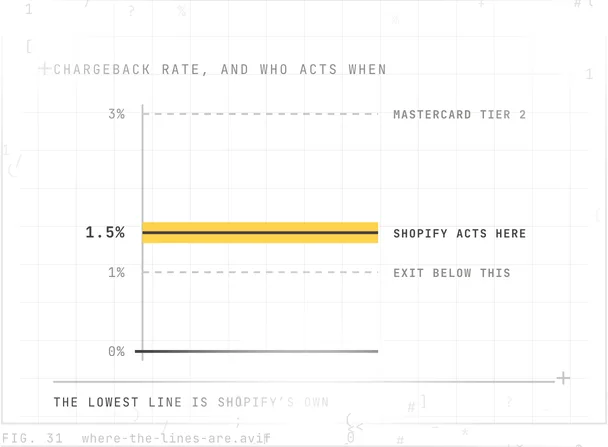
There’s no single limit. Shopify’s own threshold reaches you first: a rate of 1.5 percent or higher over 90 days can enroll you in a dispute resolution program. That holds a 10 percent reserve back from your payouts. Visa and Mastercard set separate thresholds above it.
What does Shopify bot protection actually cover?
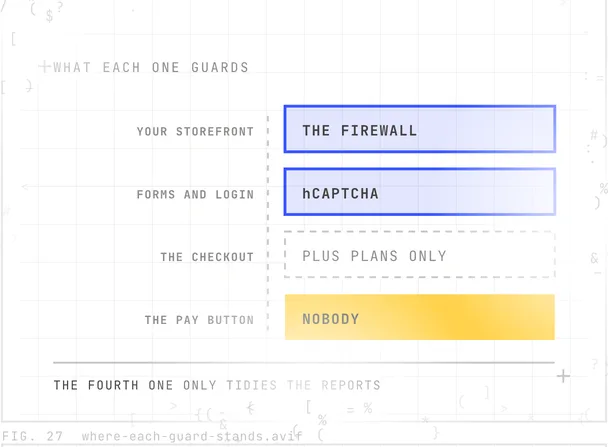
Shopify bot protection is four separate things, and only one of them touches checkout. The firewall and hCaptcha are already on. The checkout feature needs a Plus plan and was built for auto-checkout bots. Bot filtering cleans up your reports without blocking anybody.
How much is the Shopify chargeback fee?
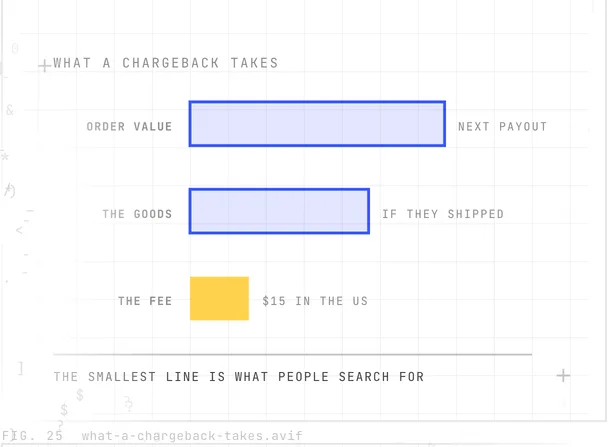
In the United States it’s $15, charged by the bank rather than by Shopify, and the amount varies by country. It comes back if you win the dispute. The disputed amount is taken as well, out of your next payout, and that part only returns if you win.
What happened to the Shopify Fraud Filter app?
Shopify’s Fraud Filter app is gone. Its App Store page now says it is not currently available. What replaced it is split in two. Fraud Control has checkout rules that block a checkout before it becomes an order. Shopify Flow acts after the order exists.
How do I know if my Shopify store is under a card testing attack?
A card testing attack is a bot running stolen card numbers through your checkout to find the ones that still work. It shows up as a burst of small orders and declined payments, often under made-up names and email addresses.
What does high risk of fraud mean on a Shopify order?
A high risk of fraud flag is a score Shopify assigns after the order exists and the card has already been charged. It reviews a payment that already went through. The score is built from the address, card and location checks Shopify lists on the order.
How much does Shopify chargeback protection cost?
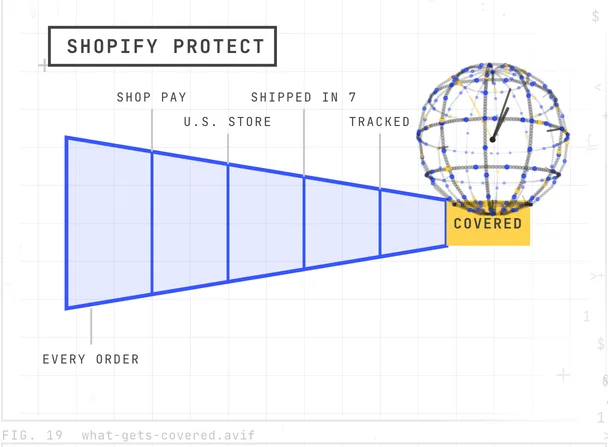
Shopify chargeback protection is free through Shopify Protect. It covers only fraudulent and unrecognized chargebacks, on Shop Pay orders from United States stores, fulfilled within seven days with tracking. Items reported as not received or not as described are not covered.
Every answer we have written is in the blog.
In the newsroom
What we have announced about Halt
Halt now unsubscribes card-testing bots from Omnisend
Native Code has updated Halt: Card Testing Blocker so it unsubscribes card-testing bots in Omnisend, usually within seconds. Unsubscribed is the one status Omnisend does not bill, so a store stops emailing the bot and stops paying for it. The update is live for every store and included at no extra charge.
Halt now removes card-testing bots from email lists
Native Code has updated Halt: Card Testing Blocker so it removes card-testing bots from a store’s email list. When Halt stops a bot at checkout, it now takes that contact off Shopify Email or Klaviyo, usually within minutes. The update is live for every store and included at no extra charge.
Halt is live: a Shopify app that stops card-testing bots
Native Code today released Halt: Card Testing Blocker on the Shopify App Store. Halt runs inside Shopify checkout and refuses card-testing attempts before any charge is made. A store owner has nothing to refund and loses no card fee. It is free for 14 days, then $6.99 a month.


Every release, and the media kit, is in the newsroom.
Where to start
Install Halt, and watch it for a day.
Free for 14 days. It begins in watch mode, so the first thing you see is what it would have stopped. Nothing to add to your theme, nothing charged after uninstall.
Read the announcement, or write to support@nativecodeapps.com with any question.